A detailed wiki for all 88 commodities, developed over the last 10 years: season, temperature, pH, TDS, pests, diseases and exactly how to treat them, in 11 languages.
We looked for it. It didn’t exist. So we wrote it.
When we searched for detailed, practical growing information for the crops we farm, we couldn’t find it anywhere. Over the last 10 years we have written it down ourselves, crop by crop, from our own farms.
88commodities10years in the making11languages
What it covers
One page per crop, with everything you need
Crop profile
Scientific name, description, article type, classification and sub-category.
Season
The season each crop grows best in, so you plant at the right time.
Growing temperature
The temperature range the crop needs for optimal growth.
pH and TDS
Target pH range and TDS for the nutrient solution.
Pests and diseases
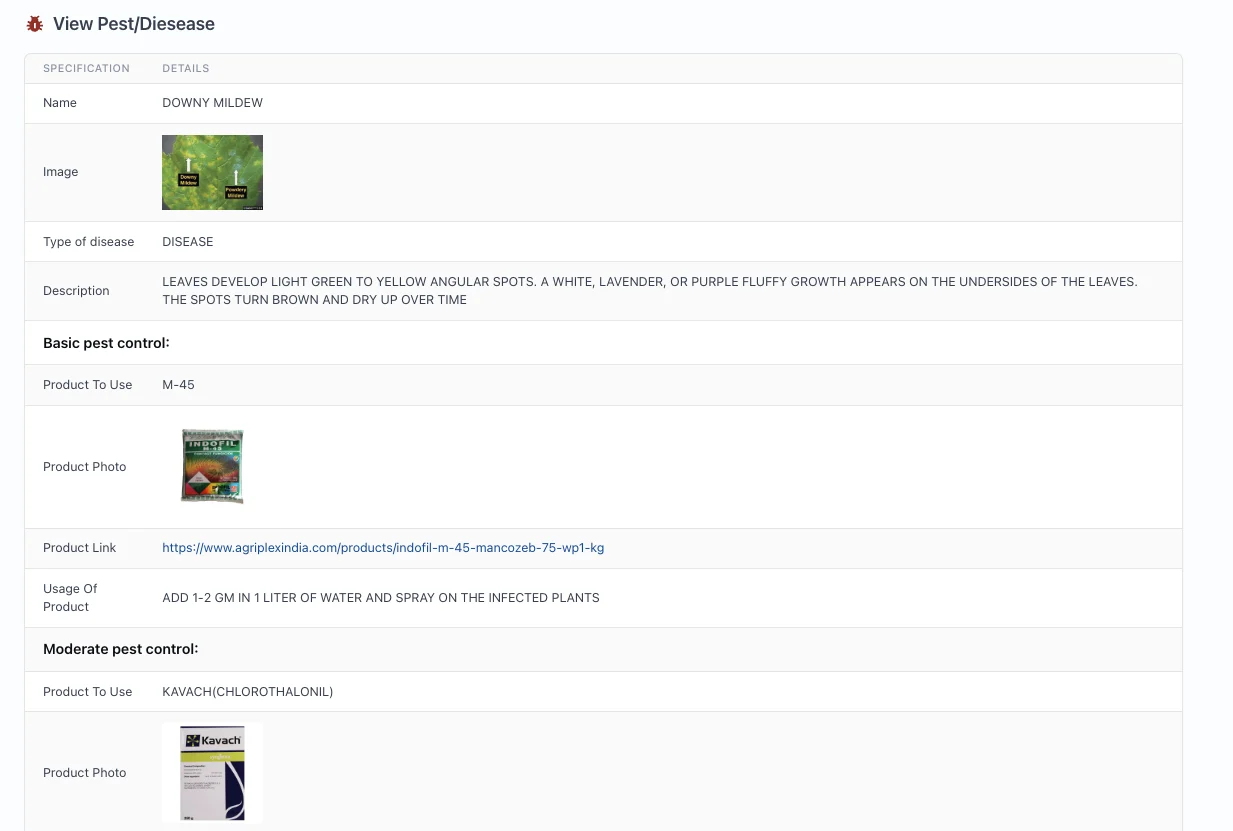
Every common pest and disease, with photos so you can recognise it.
Treatment, step by step
Basic and moderate control, with the product to use, a photo, where to buy it and the dose.
Seed and batch
Buy seed and start a new crop batch straight from the crop page.
11 languages
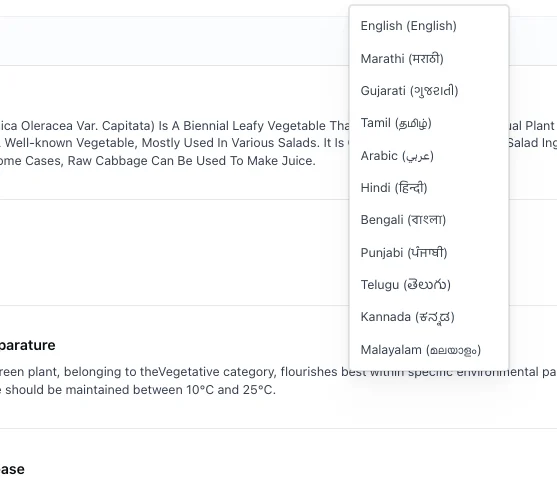
Read every wiki in English or ten more languages, from Marathi to Arabic.
Pests and diseases
Spot it, name it, treat it
Every pest and disease has photos to help you recognise it, a description of the symptoms and a treatment plan that steps up as the problem grows.
1
Basic control
The first product to use, with a photo, where to buy it and the dose.
2
Moderate control
A stronger option if the problem continues, with the same detail.
alpha.kryzen.com
A disease page: symptoms, then basic and moderate control with product and dose
Languages
Read it in your language
Every crop wiki can be read in English and ten more languages, so everyone on your farm team can use it.
EnglishEnglish
मराठीMarathi
हिन्दीHindi
ગુજરાતીGujarati
தமிழ்Tamil
తెలుగుTelugu
ಕನ್ನಡKannada
മലയാളംMalayalam
বাংলাBengali
ਪੰਜਾਬੀPunjabi
عربيArabic
alpha.kryzen.com
Choosing a language for a crop wiki
Inside the software
Find a crop in seconds
Screenshots are from the live system.
01
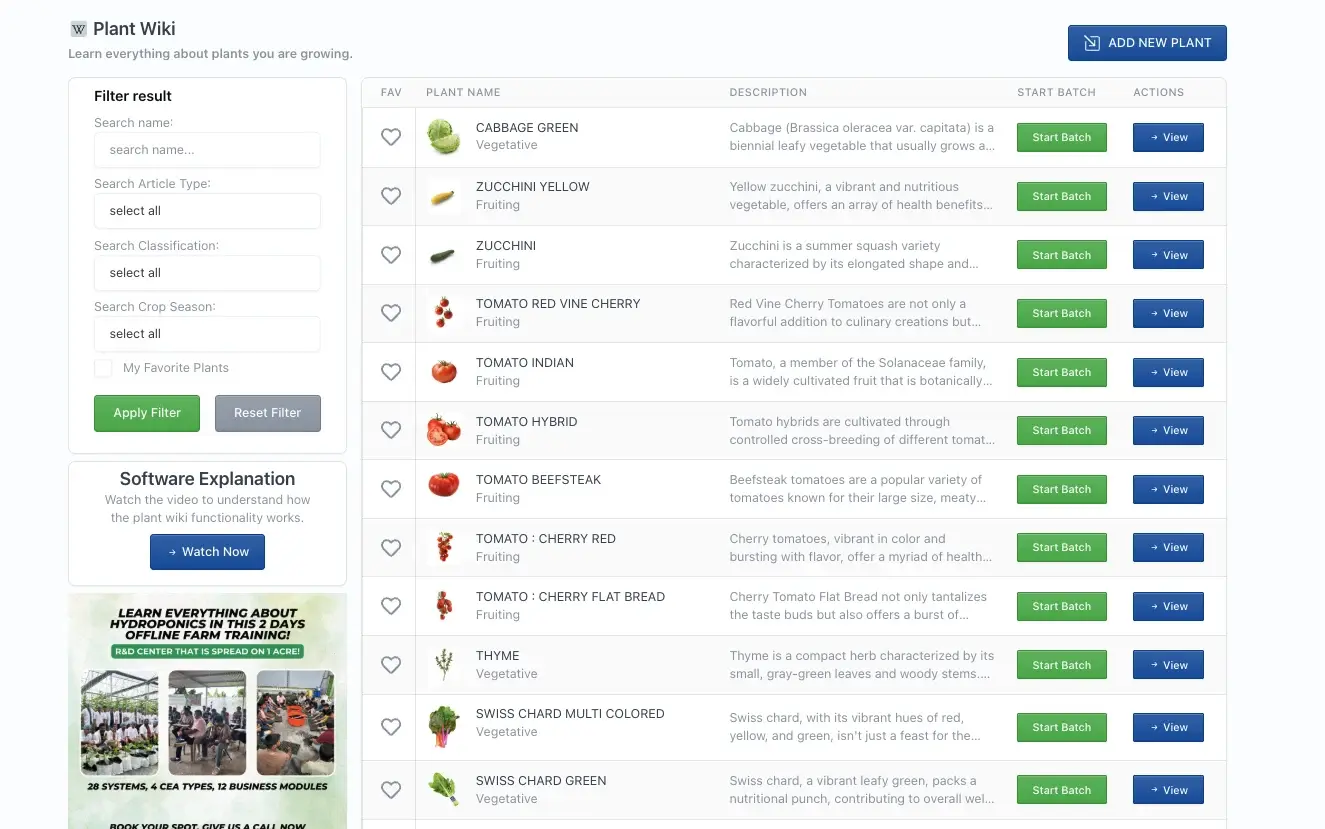
Every crop in one list
Search by name, filter by article type, classification and crop season, and save your favourite plants. Start a batch or open the full wiki from the list.
alpha.kryzen.com
The plant wiki list with filters, favourites and Start Batch
02
The full crop page
Description, season, growing temperature, pH range, TDS and the pests and diseases to watch for, with buttons to buy seed or start a batch.
alpha.kryzen.com
Cabbage Green: profile, season, temperature and pests
It is Kryzen’s plant wiki: a detailed guide to all 88 commodities we grow, from crop profile, season and growing temperature to pH, TDS, pests, diseases and how to treat them.
Why did Kryzen build it?
When we searched for this information, we couldn’t find it anywhere. So we built it ourselves, crop by crop, over the last 10 years.
Which crops does it cover?
All 88 commodities we track for commercial production, including lettuces, leafy greens, herbs, exotic vegetables, tomatoes, capsicum, chillies, brinjal, cucumbers, gourds and beans.
How does it help with pests and diseases?
Each crop lists the pests and diseases that affect it, with photos. Each one has basic and moderate control steps, with the product to use, where to buy it and how much to apply.